
If you've been using Devaka Tools as a bookmarklet — here's the news: it has grown into a full Google Chrome extension — Devaka Tools — SEO Pro Extension.
The bookmarklet remains a handy way to quickly inspect a page. But for a serious SEO workflow you need more: flexible settings, broader functionality, keyboard shortcuts, and reliable behavior on “difficult” sites. That lives better as an extension — while keeping what mattered most: it’s fast, opens when you need it, and doesn’t burn extra resources in the background.
Why the move
The bookmarklet was a great start: drag and drop, no install, no special permissions. Over time it got tight — saved settings, a modular architecture, updates without "drag the bookmark again", and UI isolation from page styles. A Chrome extension delivers all of that without giving up the lightweight feel.
Main capabilities
1. Overlay mode
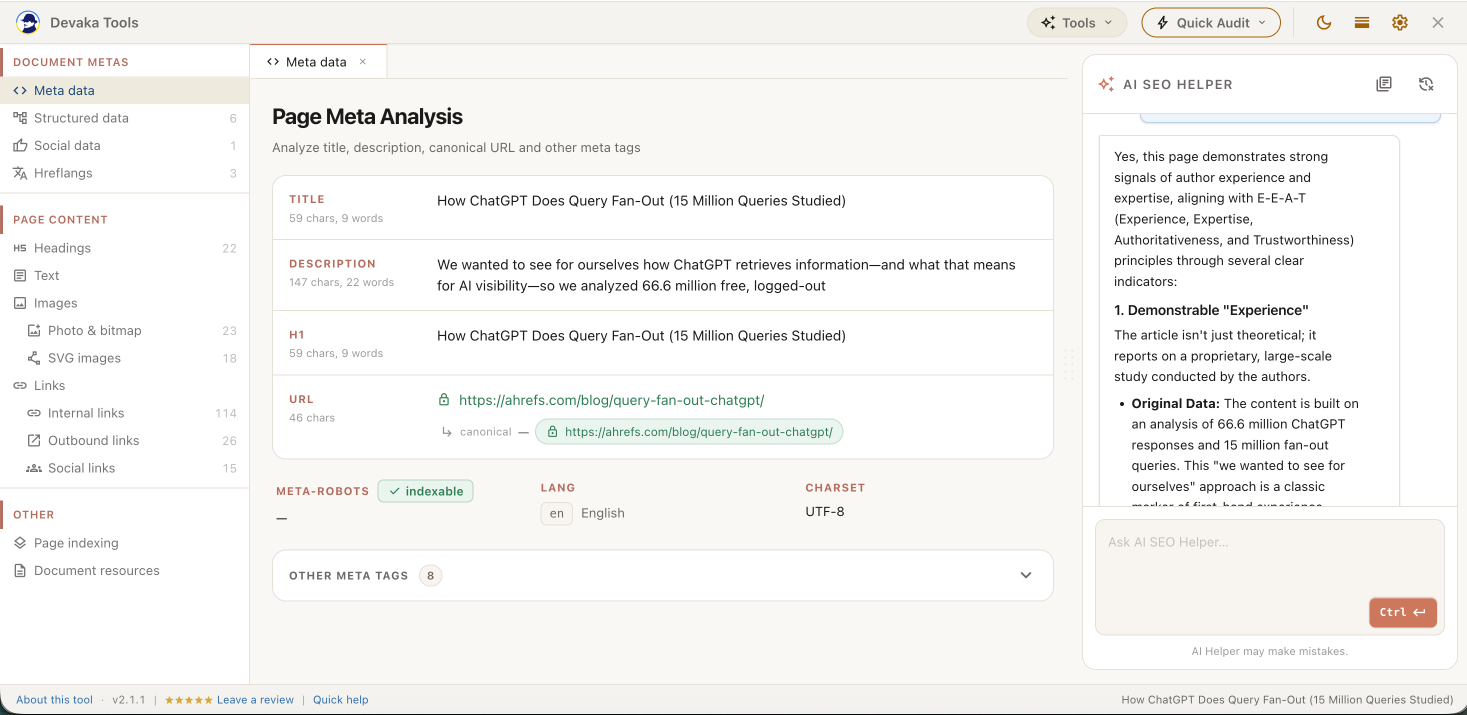
A full-viewport overlay on top of any tab. The UI runs in Shadow DOM — the site's styles don’t break it, and it doesn’t break the site. Open/close via the extension icon or Ctrl+.; Esc closes; Ctrl+/ switches to header-only mode so you can see the page under the panel. Not a popup and not a permanent narrow sidebar — a working audit layer that appears on demand.
2. On-page audit
Sidebar modules for the current page:
- Meta data (title, description, robots, and more)
- Structured data / schema
- Social data (Open Graph and similar)
- Hreflangs
- Headings (H1–H6 hierarchy)
- Text stats
- Images (bitmap + SVG)
- Internal / outbound / social links
- Page indexing
- Document resources
Click-through navigation in the DOM, counts, and export where it makes sense — a classic on-page checklist without jumping between tabs.
3. AI SEO Helper
A dedicated right column in the overlay: chat with Google Gemini in the context of the page you're auditing. You use your own key from Google AI Studio; without a key, the core audit still works as usual.
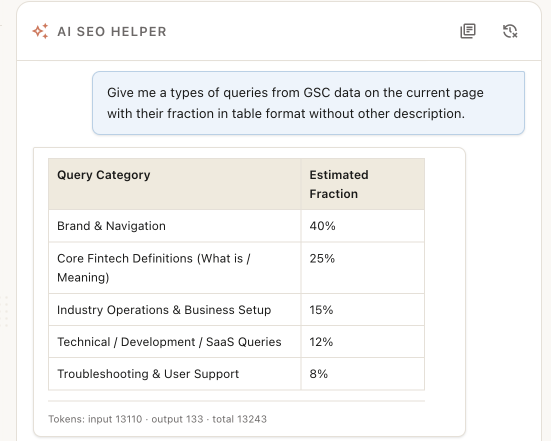
How it helps SEOs:
- quickly break down a page — content, tone, weak spots, ideas for titles / descriptions / structure;
- extract and structure content (entities, topical themes, markup drafts) without pasting HTML into a separate chat tool;
- ask questions about the active analysis panel — the model can use overlay data and pull page text/HTML when needed;
- speed up routine work: "what's wrong with these headings", "which entities to reinforce", "how would you rewrite this snippet".
In short: not a separate AI website — a helper inside the same overlay where the audit already happens.
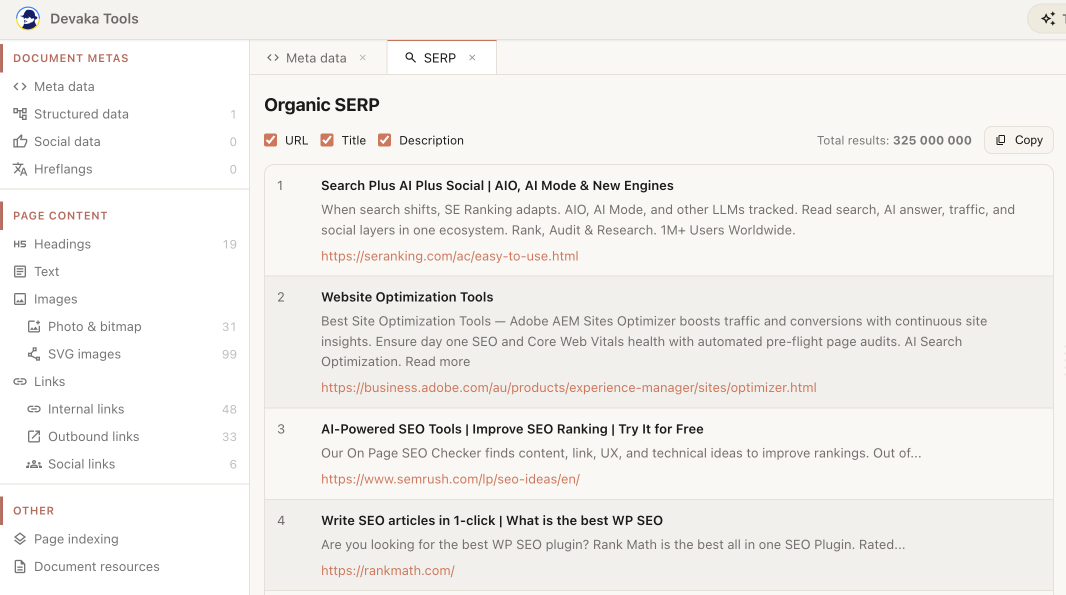
4. SERP analysis
On Google search results — a dedicated mode for organic, Images, News, and Shopping. Export URL / title / snippet, filters, result counts, easy copy. Built for fast SERP audits without hand-built scripts and spreadsheets.
5. Quick Audit
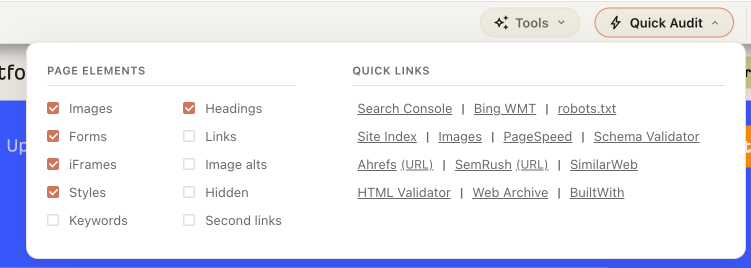
Fast toggles over the live page: hide images / forms / iframes / styles; highlight headings, links, alts, hidden elements, duplicate (second) links; keyword highlighting. Plus Quick Links into Search Console, PageSpeed, Ahrefs, Semrush, and more — one click from the current URL.
6. Tools
A separate Tools menu (Utilities + LLM Tools when a Gemini key is set).
Utilities:
- Domain Info — DNS records and server location
- HTTP Headers — response headers for the current URL
- Robots.txt Validator — allow/disallow checks for a user-agent
- UTM Generator — campaign-tagged URLs
- Export as Markdown — page text as Markdown
- Knowledge Graph — entity search in Google Knowledge Graph
LLM Tools (with a Gemini key):
- Entity Extractor
- Embeddings Tool
- Grounding Queries
- Render Diff (RAW vs rendered HTML)
- Topical Keywords
- Content Moderation
A deeper walkthrough of each tool will come in separate articles later. This is the big picture of what's already in the box.
7. Keyboard shortcuts
Built for audit rhythm, not just menus:
- Ctrl + . — show / hide the overlay (from anywhere on the tab)
- Esc — close the overlay
- Ctrl + / — header-only mode
- Ctrl + , — light / dark theme
- Hold Alt — temporary peek at the page (same idea as header-only)
- Ctrl + Enter — send a message in AI chat
How it differs from other SEO overlays
Many extensions are a left panel or a popup full of badges. Devaka Tools is a full working overlay: on-page modules, DOM Quick Audit, SERP parsing, and AI Helper in one place. The UI is isolated; modules load on demand. No "all-in-one" SaaS subscription. Lightweight in the bookmarklet spirit: if you don't open it, it barely touches resources. Plus shortcuts that match how people actually audit pages.
Download and using is free!
Chrome Web Store:
→ https://chromewebstore.google.com/detail/devaka-tools-%E2%80%94-seo-pro-ex/mciiiobohemepnafmkihbohkjhogjhia
Original bookmarklet (if you still need it):
→ https://devakatalk.com/devaka-tools/
Feedback
Install it, try it, tell me what to improve — ideas, bugs, "it would be nicer if…". Always open to suggestions: in the comments or via a review on the Chrome Web Store.
Thanks to everyone who used the bookmarklet — you're why the extension exists.
Leave a comment